
Home / Insights / Exchange Web Services Enforcement Begins 10 October
Microsoft 365 / Email & Backup
Exchange Web Services Enforcement Begins 10 October — Here’s What To Check
If a backup tool, a migration utility or a CRM mail plugin quietly talks to your mailboxes in the background, the week of 10 October is when Microsoft starts cutting some of those connections off — and your inbox will look completely normal while it happens.

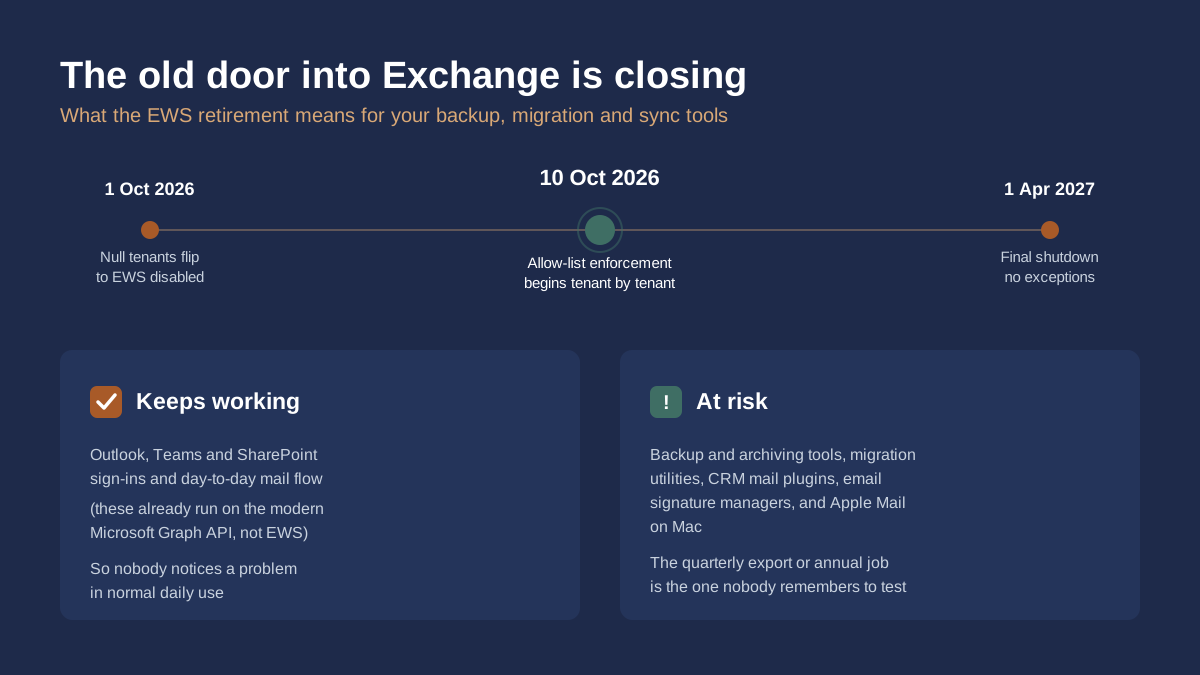
Exchange Web Services, or EWS, is the older API that third-party tools have used for years to reach into Microsoft 365 mailboxes — reading, backing up and moving mail, calendars and contacts. Microsoft has been winding it down in favour of the modern Graph API since 2023, and that wind-down has now reached its active phase. Microsoft’s own Exchange Team blog confirmed that EWS deprecation in Exchange Online started on 1 October 2026, and that any tenant left with its EwsEnabled setting at the default (“Null”) on that date has it switched to disabled as the rollout reaches them. A second, more consequential change follows on 10 October, when Microsoft begins enforcing an AppID allow-list for any tenant that re-enables EWS — meaning only specifically approved applications can use it at all, as Microsoft’s EWSAllowedAppIDs announcement sets out. The whole protocol is switched off everywhere on 1 April 2027, with no further extensions.
Why nothing looks broken
This is the same shape of problem as most quiet infrastructure deadlines: the everyday things keep working, so nobody goes looking for a fault. Outlook, Teams and SharePoint sign-ins already run on the modern Graph API, not EWS, so normal email and meetings carry on exactly as before. What actually breaks sits one layer back, in the tools that were never part of daily attention in the first place. A mailbox backup job that runs overnight. A CRM plugin that syncs calendar invites. A migration tool bought for a one-off project two years ago and never uninstalled. None of these throw an error banner anyone sees. They just quietly stop succeeding, and the first sign is usually someone discovering, at the exact moment they need a restore, that the backup silently stopped weeks ago.
What’s actually at risk
The categories most commonly affected are mailbox backup and archiving products, migration utilities, CRM systems that plug directly into mail and calendar data, email signature management tools, and Apple Mail on macOS, which still relies on EWS to connect to Microsoft 365 rather than the newer protocols Apple uses elsewhere. Power Automate flows with older Exchange connectors can also be caught out. The risk isn’t limited to tools you use constantly, either — it’s arguably higher for the ones used rarely. A quarterly compliance export or an annual archive job is exactly the kind of thing that gets missed when Microsoft auto-builds an allow-list from the last 60 days of usage, because it simply wasn’t running during that window.
What to check before 10 October
- Check your tenant’s current setting by running
Get-OrganizationConfig | Select EwsEnabledin Exchange Online PowerShell. “Null” means Microsoft’s automatic switch-off applies to you; “True” means you control an allow-list; “False” means EWS is already blocked. - Pull the EWS usage report from the Microsoft 365 admin centre (Reports > Usage > Exchange Online) and identify every application ID that has actually called EWS recently.
- Cross-reference those application IDs against your actual backup, migration, CRM and signature tools, and confirm with each vendor whether they’ve already moved to the Graph API.
- If you need to keep using a tool that still depends on EWS, set
EwsEnabledtoTrueand explicitly add its application ID toEwsAllowedAppIDsbefore 10 October, rather than leaving it to Microsoft’s automatic 60-day allow-list, which can miss infrequent jobs. - If your business genuinely has nothing left relying on EWS, set it to
Falseexplicitly rather than leaving it on “Null” — a deliberate, confirmed state is safer than an assumption.
Why this belongs on a compliance checklist too
A mailbox backup that silently stops running isn’t just an IT inconvenience — it’s a data-availability gap. Both NIS2 and GDPR’s Article 32 expect businesses to maintain the ability to restore access to data in a timely manner after an incident, and “our backup tool quietly lost its connection in October 2026 and nobody checked” is not a position any business wants to explain after a ransomware incident or an accidental deletion. Treating this as a scheduled check now, rather than a surprise discovered during a restore, is the cheaper version of the same conversation.
If you manage your own Microsoft 365 tenant, the PowerShell check above takes a few minutes and is worth running this week rather than after 10 October. If you’d rather have someone track changes like this as part of ongoing tenant management, that’s part of what our Microsoft 365 & Intune management covers, alongside the backup and recovery checks under disaster recovery & backup.